
Translating SKlauncher
Thanks for considering helping with translations! SKlauncher is translated by people kind enough to maintain its localisation files. Help out and you'll be credited in the About section of the launcher settings.
What NOT to do
- Don't paste output from Google Translate, etc. without checking. Machine translations are often inaccurate.
- Don't make changes that aren't necessary. We get the appeal of seeing your name in the launcher, but please don't. New strings appear over time, so wait for the next genuine opportunity.
- Stick close to the original. For example, don't shorten
Uhoh! It looks like the game has crashed. Sorry for the inconvenience :(into the equivalent ofOh no! Game has crashed!. - Don't add trailing punctuation that isn't in the original string.
How to get started
First, check whether your language is already translated. Open the translations folder and look for a file with your language code. If it exists, you can update it. If not, create a new translation.
You need a GitHub account to contribute. Sign up here if you don't have one.
Creating a new translation
In the translations folder, create a new file named
sklmessages_XX_XX.propertieswhereXX_XXis your language code.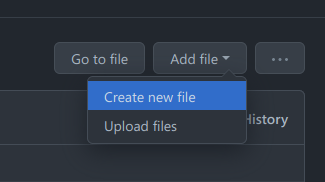
Find your language code on the Minecraft Wiki languages page. Use the ISO 639-3 column.
For example, Silesian uses
szl_PL, so the file issklmessages_szl_PL.properties.
Copy the contents of
sklmessages_en_US.propertiesinto your new file. Then translate, line by line:diff-lang.name=English (US) -lang.code=en_US +lang.name=Ślōnskŏ gŏdka +lang.code=szl_PLlang.nameis the name shown in the language list. Write it in your own language.To be credited, put your name in
about.translation.authors, for exampleabout.translation.authors=YourName. Separate several names with;.
TIP
- Save the file as UTF-8.
- Keep
%s,%.1f, and\nexactly as they are in the English line. - If you can't translate a line, leave it out. The launcher shows the English text instead.
Editing an existing translation
If your language already has a file, just edit it.
- Open the file in the translations folder and click the Edit (pencil) icon.
- Change the text after the
=sign on each line you want to translate. - Scroll to the bottom, add a commit message, and click Commit changes.
Don't worry about being perfect. We review every contribution before merging.
How to submit your translation
To submit, open a pull request.
- Go to the pull requests tab of the SKlauncher repo.
- Click New pull request in the top-right.
- Choose
mainas the base and your branch as the compare branch. - Add a title and description. Click Create pull request.
That's it. Reviews usually take 1 to 2 days, sometimes less. Watch your email or GitHub notifications for follow-up comments.
After your pull request is merged, your translation is added to the launcher in a later update. For a new language, the SKlauncher team also adds it to the language list. You don't need to do this yourself.